Trust Center Platforms Compared for B2B SaaS Companies
Enterprise buyers evaluate trust centers on three criteria before deal talks begin.

The three dimensions that set trust center platforms apart
Enterprise buyers look at the trust center before setting up a first meeting, and if they can't find SOC 2 status or residency info they trust, the sale slows before any salesperson sees trouble coming. Procurement teams treat the trust center like an audited set of books: proof, not marketing, because it consolidates compliance evidence in one place. This is why trust center platforms now fall into distinct lineages with very different logic, making selection an architecture choice, not a vendor checkbox.
Proving the security work happened is the bottleneck whenever a new buyer asks those 200 questions in their slightly different spreadsheet. Demonstrating the work keeps repeating itself for every fresh buyer sending those same 200 questions in a barely changed spreadsheet. Cyberbase learned 43% of firms report compliance certification delays slowing deal cycles, and that fits reality: groups running a good compliance program still burn days re-proving their work for each new procurement rep.
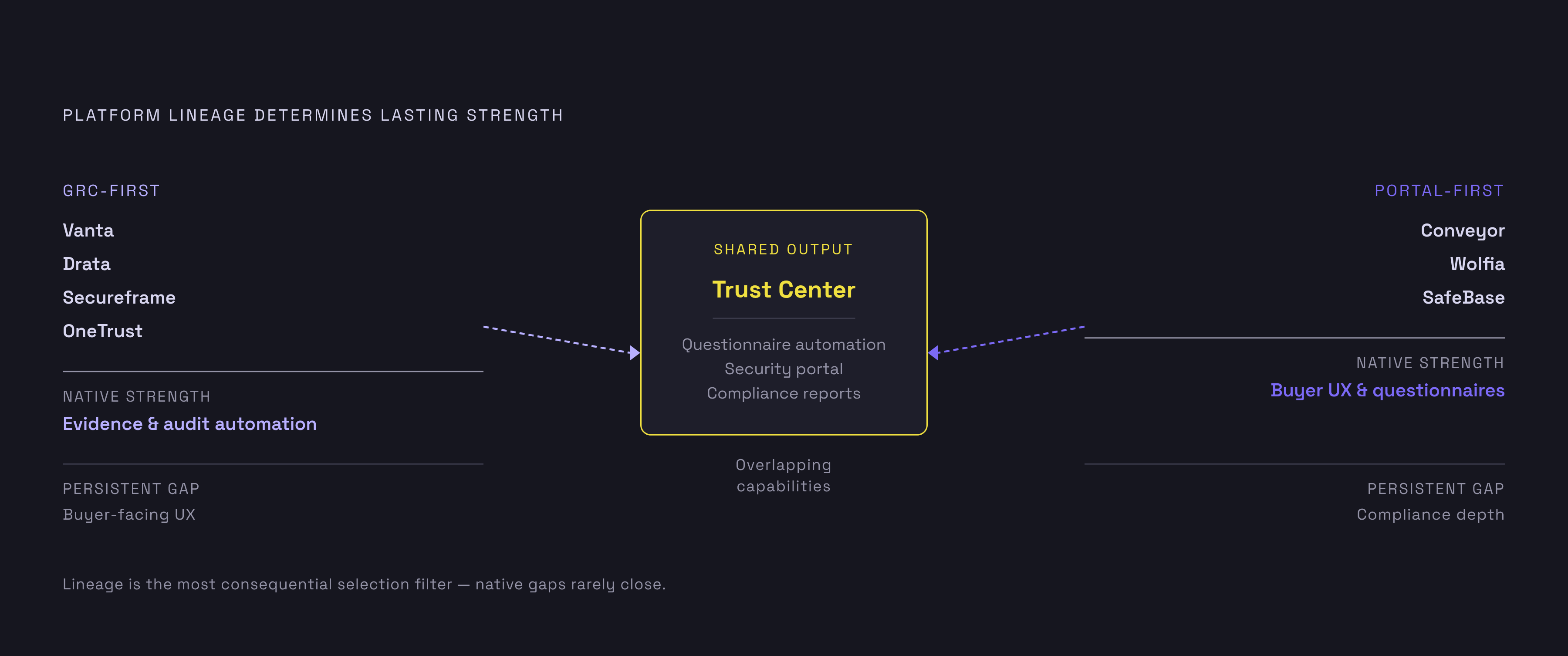
Trust center platforms fall into rival beginnings, and that starting point shapes what gets built beyond what a marketing page admits. One came from GRC and regulatory work: Drata (SafeBase joined it), Vanta, OneTrust, and Secureframe set up the controls early and saw the trust page as a later output of that setup. The other lineage took the reverse path, making trust portals and questionnaire automation the main focus early on: Conveyor and Wolfia belong here. Choose the wrong lineage for the problem you're really facing, and you'll spend money on strengths you'll never use. A team drowning in questionnaires doesn't need a compliance feed that's synced beautifully. A stale, manually maintained portal doesn't need quicker auto-fill for a team.
Most buyers look at just one of those three dimensions that determine how something fits, and they tend to focus on the least helpful one.
The public-facing portal is the obvious piece: branded, gated behind NDAs where it needs to be, tracking who viewed what and when. When a portal deflects inbound traffic properly, it answers the bulk of buyer questions without needing staff. But this is the easiest piece to check during a trial and the easiest to overweight, because a polished portal running on stale information hurts more than having no portal.
Questionnaire automation depth counts for more than most people expect, until a spreadsheet with 200 questions arrives and turnaround is two days. Certain software will auto-fill answers into Excel, Word docs, PDFs, and web portals such as OneTrust and Coupa. Others just flag answers so someone can copy and paste them, which seems a small gap until you're up at three a.m. doing it yourself. Volume caps count too: software meant for 10 questionnaires each month is different from software meant to cover 100, and no polish closes that divide.
If it keeps working comes down to what most people miss. A trust center pulls straight from the compliance program, so a new certification or revision lands in it automatically, and no one has to bother uploading a new PDF whenever an auditor OKs a document. Manual uploads are tedious, and they cause trust centers to go stale, which a sharp buyer reads as negligence rather than a simple oversight. A page stuck in the prior review period shows the customer no one's paying attention, and it hurts more than no trust center.
Another criterion is showing up: how easily the platform connects to related compliance tools for mapping, rules, permissions, and rights-request workflows. Enterprise buying reviews now include SOC 2, ISO 27001, and personal information rules; without those links, a trust center reveals holes where major contracts stop.
Judge every option against the same few questions. Does it change by itself, or does manual babysitting come into play? How well does the AI perform on real questionnaire answers, since poor results just lead to manual rewrites regardless? Does it work with the CRM, putting security reviews alongside sales records? Will it work for multi-region and multi-product setups? Is the pricing easy to follow, or packed with tiers that appear only after a sales conversation?
Platforms side by side: what each offers and who it suits
Vanta Trust Center is built for 50-to-500-person teams already on, or thinking about, Vanta to handle compliance automation. Its standout draw: real-time sync, since the trust center pulls Vanta's compliance records, certifications and rule updates land on the portal automatically, with no manual wrangling. AI chatbot responds to buyer queries on the portal, NDAs go through click-wrap or DocuSign, CRM links security work to revenue, and engagement analytics track who saw what. The add-on costs $5,000 per year beyond Vanta’s base platform, with Vanta connecting to a broad range of other products. SafeBase handles Salesforce logic and tailoring what prospects see better, while Conveyor and Wolfia focus more on auto-answering forms. Vanta makes the most sense for a team whose main struggle is keeping its portal in step with the compliance program's constant updates.
SafeBase, now with Drata following February 2025’s $250 million buyout, the biggest transaction in this space, targets enterprise firms with 500 or more employees that need buyer experience customization and Salesforce workflow logic. It includes buyer engagement analytics, NDA handling, managed document permissions, and a Chrome plug-in covering 20+ portals such as OneTrust, Panorays, ProcessUnity, and ServiceNow. The clearest trade-off: SafeBase is priced standalone, often starting at $15,000. Its Foundation tier limits questionnaire assistance to 10 questionnaires, and revenue-driven analytics stay locked to the Enterprise tier. The knowledge base also calls for manual upkeep, with materials uploaded and tagged by the account, not syncing automatically, so buyers choosing SafeBase for Salesforce depth need to expect tagging work indefinitely. It fits best when Salesforce depth and the buyer experience drive the choice and cost is no constraint. A small team only looking for the compliance feed to update itself should skip it.
Conveyor is for enterprise trust staff handling many assessment requests at once for different product lines, markets, and rule sets. It fits into a current compliance setup without ripping anything out, and questionnaire automation pulls from the same knowledge the trust center itself does, so both sides end up with identical answers. 2026 pricing begins at a free tier (10 trust center allocations per month) and tops out at the platform tier, $9,600 annually, with no seat limit and 100 questionnaire processing units, each unit covering one processed questionnaire. It includes multi-product trust portals and granular user permissions, aimed at high-volume operations, not one small team. For portal automation, Conveyor offers a strong option among questionnaire-first platforms, and it fits groups whose bottleneck is volume of questionnaires or multi-product scale rather than polish.
Wolfia is for groups fielding a high volume of security questionnaires that repeat, a workload that can reach 200-plus questionnaires annually. The tool auto-fills Excel, Word, PDF, plus over 45 web portals, including OneTrust, ServiceNow, Zip, Ariba, Coupa, and adds a citation to each reply so any reviewer can verify the details before sending. With Google Drive, Confluence, SharePoint, and Slack feeding it, the knowledge base syncs automatically, and manual tagging of questions or answers never comes into play. Wolfia Expert provides benchmark answers for questions not yet stored internally, and the free trust center itself sits inside the broader platform, with no charges per-visit and no questionnaire caps. Security addenda get legal sign-off free of charge. Compared with SafeBase, the split is clear: Wolfia leads on auto-fill range and live content, while SafeBase leads on sales flow tied to Salesforce logic. Teams that want auto-fill and portal reach first should pick Wolfia over SafeBase, since form-completion matters more to them than how the Salesforce demo comes across.
How consolidation is now reshaping options for buyers evaluating platforms
Three acquisitions in rapid succession show where this industry is going. Drata spent $250 million on SafeBase, Trustpage got absorbed by Vanta, and Tugboat Logic went to OneTrust. Trust center companies keep getting bought by bigger GRC players, and a customer who chose a trust center platform may find its direction, service, or pricing adjusted after an acquisition.
Acquisitions can shift product direction quickly, so prospective buyers should study the roadmap and positioning before committing. The same care matters just as much when picking a trust center now, and buyers who skip diligence may face unexpected changes in product direction or pricing.
When evaluating a bought platform, be blunt, not politely. What's different about the roadmap? Has pricing changed? What are they keeping, and what's going away? Vendors will respond to these questions if pushed, and a vague response is itself a signal, showing that the acquiring company still hasn't made up its mind about the product. You shouldn't sign on until they have.
Teams with standalone specialists on their shortlist should take independence seriously, not brush it off. Some buyers need a trust center, one that plugs into the compliance stack already in place, not one that nudges them into one GRC vendor's ecosystem. For those groups, autonomy counts, and brushing it off simply because the bought platforms have larger marketing budgets flips the trade-off around.
Aligning platform with company stage and identifying friction points
What counts as friction depends on a company's stage. Software built for 40 employees breaks at 400, and going the other way, paying for heavy corporate systems before they're ready, burns cash and drags a lean crew down for nothing.
In the seed to Series A stretch of about 1 to 50 staff, the friction comes from showing enough security credibility to win the first few deals before any compliance program is in place. TrustCloud offers, for companies under 20 people, a free tier; Sprinto costs about $6,000 to $8,000, while ComplyJet charges a flat fee starting at $5,000 per year. These startups aren't ready for Conveyor's permissioning across regions or the Salesforce depth SafeBase's tool offers, so spending cash on that now just funds a phantom issue. What they need is a credible, quick way to get a trust page up before an enterprise asks and the sale stalls.
The same mismatch shows up across every stage, from a 10-person outfit to a company many times larger: purchasing for a company anticipated three years down the line, rather than the one here right now, dealing with the friction that's already there. A Series C compliance program won't help the team land a contract right now.